OpenCms
knowledge base
An overview of text formatting buttons
Here is an overview of text formatting buttons. Please see our editor button overview as well.

Please note
Not all buttons are activated for structured content files. By default, structured content editors only display the most common buttons.
Format
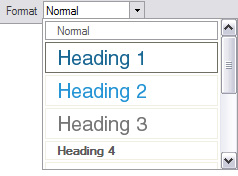
The Format drop down allows you to format your content with specific heading styles. The heading styles are pre-programmed based on your website design.
Heading 1 – Main Headings
Heading 2 – Sub Headings
Heading 3 – Sub-Sub Headings
… and so on.
Heading styles are important for search engine optimization. In order to apply heading styles, you need to apply clear paragraph breaks to the content – see our practical example.
 Bold
Bold
 Italics
 Underline text.
 Strike through text
 Subscript
Use for subscript like H20.
Please note
The plain text paste function will not carry over subscript from other sources – when pasting content from other sources subscript formatting will need to be re-applied manually in the editor.
 Superscript
User for superscript like footnotes.
Please note
The plain text paste function will not carry over superscript from other sources – when pasting content from other sources superscript formatting will need to be re-applied manually in the editor.
 Left
Left
Left align content.
 Centre
Centre content on the page.
 Right
Right
Right align content.
 Justify
Justify content.
 Insert Numbered List
Create a numbered list (see our practical example).
 Insert Bulleted List
Created a bullet list (see our practical example).
 Decrease Indent
This is used to define hierarchy for bullets and numbered lists (see our practical example).
 Increase Indent
This is used to define hierarchy for bullets and numbered lists (see our practical example).
 Text Colour
Change the text colour. This option is not enabled for all editors.
 Background Colour
Change the background colour for a page. This option is not enabled for all editors.